Pixel Size Explained
The pixel-size slider is the most important control in the whole tool, and the one people fiddle with the most. Once you know what it's really doing, picking a setting for any photo takes about two seconds. This guide shows the same image at six settings so you can see the effect, and gives you the one bit of arithmetic that makes it predictable.
By Richard Wallace · Published 5 August 2026 · Updated 5 September 2026
What the slider does
Turn the pixel size up and the tool carves your image into bigger square blocks, giving each block a single averaged colour. A pixel size of 10 means every 10 × 10 patch of the original becomes one big pixel. So a bigger number gives you fewer, larger pixels and a chunkier, lower-resolution look. A smaller number gives more, smaller pixels and finer detail. You're basically setting the resolution of your finished pixel art.
The same image at six settings
This is a 512-pixel-wide sunset illustration, converted with Original colours so only the pixel size changes. The number of blocks across is simply the width divided by the pixel size.
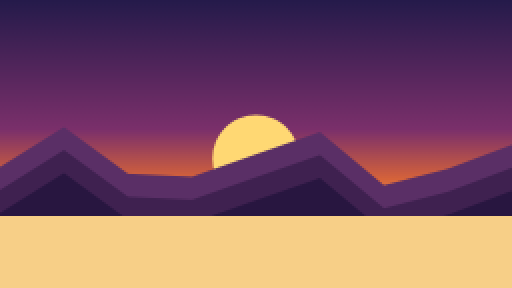
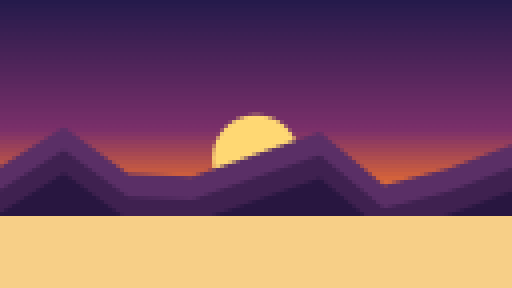
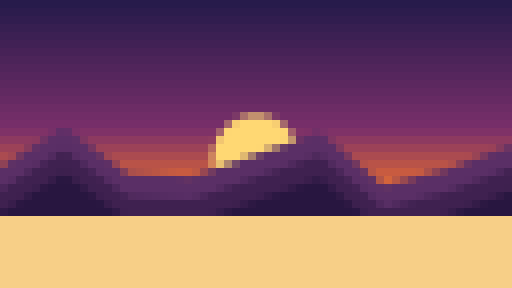
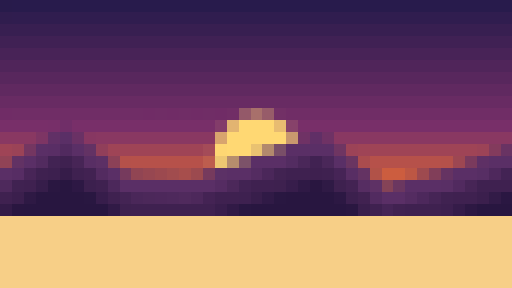
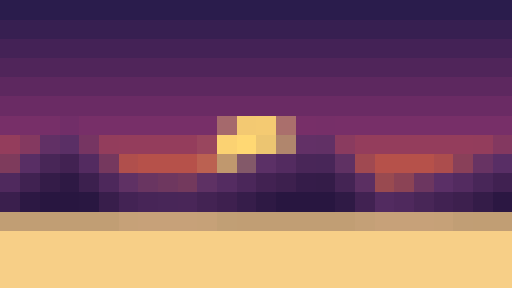
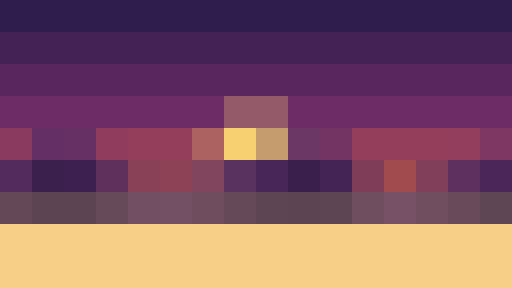
At 2 and 4 it barely reads as pixel art. At 8 it is unmistakably retro but the mountains, sun and sky are all still there. By 20 the sun has become a single yellow block and by 32 it's an abstract pattern. Notice that this is a small source image. A 4000-pixel phone photo at pixel size 32 would still have 125 blocks across, which is roughly where this image is at pixel size 4. That's the crucial point: the right pixel size depends on how big your photo is.
The only formula you need
blocks across = photo width ÷ pixel size
Blocks across is what actually decides how the result looks, and it's worth having a feel for a few landmark numbers:
| Blocks across | Feels like | Good for |
|---|---|---|
| 250 or more | A lightly pixelated photo | Large prints, subtle effect |
| 120 to 200 | A detailed 8-bit game screen | Landscapes, group shots, anything busy |
| 60 to 120 | Classic pixel art | Portraits, pets, most photos |
| 32 to 60 | Chunky, bold sprite | Logos, simple objects, avatars shown large |
| Under 32 | Mosaic or abstract | Backgrounds, patterns, art pieces |
So to hit a particular look, divide your photo's width by the number of blocks you want and set the slider to that. A 3000-pixel-wide photo aiming for 100 blocks across wants a pixel size of 30. A 800-pixel screenshot aiming for the same look wants 8.
Matching a real console
If you want your image to have the same resolution as an actual retro machine, the same formula works. Crop your photo to roughly the right shape first, then divide.
| Machine | Screen | Pixel size for a 1600 px wide photo |
|---|---|---|
| Game Boy | 160 × 144 | 10 |
| Game Boy Camera photo | 128 × 112 | 12 or 13 |
| PICO-8 | 128 × 128 | 12 or 13 |
| NES | 256 × 240 | 6 |
| ZX Spectrum | 256 × 192 | 6 |
| Commodore 64 multicolour | 160 × 200 | 10 |
| CGA | 320 × 200 | 5 |
The slider goes from 2 to 40, so for a very large photo you may not be able to get down to Game Boy resolution in one go. Resize the photo smaller first, then convert.
Match it to your subject
- Faces and portraits: aim for 60 to 120 blocks across. Faces live or die on the fine relationship between the eyes, nose and mouth, and that vanishes fast as the blocks grow.
- Logos and simple shapes: 30 to 60 is fine, because bold shapes hold up even when you simplify them hard.
- Busy scenes and landscapes: keep it above 120, or the detail collapses into a mess.
- Abstract or decorative: go wild. If recognisability doesn't matter, big chunky pixels look fantastic.
- Avatars: remember it will be shown small. Around 48 to 64 blocks across looks deliberate at profile-picture size. The avatar guide has more.
The preview updates live as you drag, which makes this a two-second job.
OPEN THE CONVERTERHow pixel size and palette interact
Palettes with very few colours, such as Game Boy and CGA, remove a lot of detail on their own, so they usually want a slightly smaller pixel size than you'd use with NES or Original colours. Conversely, a large pixel size hides the speckle you sometimes get when neighbouring blocks flip between two similar palette colours, so if a result looks noisy, nudging the size up by a couple of steps often cleans it up.
Your source size matters too
A large, high-res image can take a bigger pixel size and still have plenty of blocks left to describe the subject. A small image is already short on detail, so even a modest pixel size can wipe it out. If your results keep coming out too rough, try starting from a bigger source photo before you push the pixelation. The reverse is also true: a huge photo at pixel size 2 will just look like the original photo, because 2000 blocks across is not pixel art.
The way I actually do it
- Crop to the subject.
- Start with the slider around the middle.
- Push the pixel size up until the retro effect looks strong.
- Back off a step or two until the subject is comfortably recognisable again.
- If it's headed for somewhere small like an avatar, imagine it shrunk and lean toward the smaller setting.
Because it all updates in real time, this takes seconds, and there's no single correct number. The right pixel size is simply the one that gives you the balance of retro feel and clarity you're after.
Frequently asked questions
What pixel size should I use?
Divide your photo width by the number of blocks you want across. Around 60 to 120 blocks suits portraits and most photos; 120 to 200 suits landscapes; under 60 gives a bold, chunky sprite look.
Does pixel size change the size of the downloaded image?
No. The download is the same width and height as your original photo. Pixel size only changes how large each block is within it.
◀ ALL GUIDES