8-Bit vs 16-Bit vs Pixel Art
People say "8-bit" to mean blocky graphics, "16-bit" to mean slightly less blocky graphics, and "pixel art" to mean either. Meanwhile a photo editor will happily tell you that a perfectly ordinary JPEG is an "8-bit image". These are all different things. This guide untangles them, and explains what the converter on this site is actually making.
By Richard Wallace · Published 5 September 2026
8-bit and 16-bit as hardware generations
In gaming, the numbers describe the processor in the machine. 8-bit consoles and computers, the NES, Master System, Game Boy, ZX Spectrum, Commodore 64 and others, had CPUs that handled 8 bits of data at a time. The 16-bit generation, the Mega Drive, SNES, Amiga and Atari ST, handled 16. More bits meant more memory, more speed, and graphics chips that could push more colours and more detail.
| 8-bit generation | 16-bit generation | |
|---|---|---|
| Years | Roughly 1983 to 1990 | Roughly 1988 to 1995 |
| Typical resolution | 256 × 240 or lower | 320 × 224 or thereabouts |
| Colours on screen | A few dozen at most | Dozens to a few hundred |
| Colours to choose from | 16 to 64 | 512 to 32,768 |
| Look | Flat, bold, limited palette | Shaded, gradients, parallax layers |
| Examples | NES, Game Boy, C64, Spectrum | SNES, Mega Drive, Amiga |
Both generations drew with pixels, and both are "pixel art" in the modern sense. The difference is how many pixels and colours were available. A 16-bit sprite can have smooth shading and subtle hues; an 8-bit sprite has to make do with three or four flat colours and bold outlines.
8-bit as a colour depth
Here's where the confusion comes from. In photography and image editing, "8-bit" means something completely different: it describes how many bits are used to store each colour channel of each pixel. An 8-bit image uses 8 bits for red, 8 for green and 8 for blue, which is 256 levels each and about 16.7 million possible colours in total. Almost every JPEG and PNG on the internet is 8-bit in this sense. A "16-bit image" in Photoshop has 65,536 levels per channel and is used for high-end editing, not for retro games.
So an "8-bit image" in a photo editor is a full-colour modern photo, and an "8-bit image" in a retro-gaming conversation is a picture with maybe 16 colours. Same words, opposite meanings. When people search for an "8-bit image converter" they nearly always mean the retro kind, which is what this site does.
Pixel art as a style
Pixel art is any image where individual pixels are placed deliberately and are meant to be seen. It doesn't require a particular palette or resolution. A 1990 NES sprite is pixel art, and so is a 2024 indie game running at 640 × 360 with thousands of colours. What makes something pixel art is intent: every pixel is a decision, edges are hard, and the image is usually shown scaled up so those decisions are visible.
That's why "8-bit" and "pixel art" get used interchangeably even though they're not the same thing. The 8-bit era is where the style came from, so its look, small palette, hard edges and chunky pixels, became the shorthand for pixel art in general.
Which one does this converter make?
Technically, all three at once, depending on which meaning you use:
- The download is an 8-bit-per-channel PNG in the photo-editing sense, like any normal image file.
- It's rendered in an 8-bit-generation palette if you pick Game Boy, NES, ZX Spectrum, Commodore 64 or CGA, each of which is the actual colour set of an 8-bit machine. PICO-8 is a modern palette designed to look like one.
- And it's pixel art in style, though converted rather than hand-drawn, with each block a single flat colour and hard edges between them.
What it is not is a 16-bit look. There's no 16-bit palette in the converter because a 16-bit machine's palette is so large that mapping a photo to it barely changes the colours; the result would just be a pixelated photo, which is what the Original colours option already gives you.
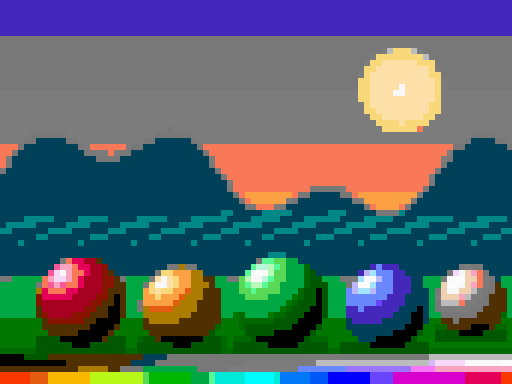

The pair above shows the difference well. Same image, same pixel size. The NES version has the flat, posterised colour of an 8-bit machine. The Original colours version keeps the smooth gradients and thousands of colours, which is much nearer to what a 16-bit console would have shown.
Pick an 8-bit palette, or keep your original colours for a 16-bit feel. Both are one click away.
OPEN THE CONVERTERQuick reference
| Term | In gaming | In photo editing |
|---|---|---|
| 8-bit | Consoles and computers of the 1980s, with tiny palettes | A normal image with 256 levels per colour channel |
| 16-bit | Early-1990s consoles with hundreds of colours on screen | A high-precision image with 65,536 levels per channel |
| Pixel art | Any image where individual pixels are placed on purpose | The same, usually made in a dedicated editor |
| 1-bit | Two-colour graphics, like early Macs or the Black & White palette here | A pure black-and-white bitmap |
Frequently asked questions
Is an 8-bit image the same as pixel art?
Not necessarily. In retro gaming, 8-bit refers to the 1980s hardware whose limited palettes created the classic pixel-art look. In photo editing, an 8-bit image is any normal full-colour photo with 256 levels per channel.
What is the difference between 8-bit and 16-bit graphics?
16-bit consoles such as the SNES and Mega Drive could show far more colours and detail than 8-bit machines such as the NES. 8-bit graphics are flatter and bolder; 16-bit graphics have shading and gradients.
◀ ALL GUIDES